

Click photos next to description to watch videos and tests from process

Video walk through of TouchDesigner project during an earlier phase of development.

The main focus of Projection Play Place is a large interactive rear projection wall. A Mcrosoft Kinect depth camera is used to detect user bodies, hand positions, and sound - all of which will effect visual interaction.
TouchDesigner, a live visual development platform by Derivative, is used to ingest data from Kinect sensor and several other elements within the space to create real-time reactive visuals based on movement, sound, and physical interaction with play-based objects in the space.
Click picture to the left to watch a video walk through of TouchDesigner project during earlier phase of development.

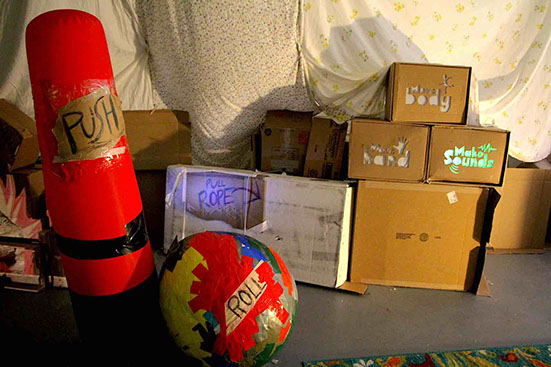
Projection Play Place contains several play-based physical objects with instruction to push, pull, roll, and the sort written on them.
Any physical interaction with these elements will cause additional visual reactions on the large projection screen. Pulling on the jump rope will change the type of input that the projection wall reacts to from silhouettes of users' entire body, to hand positions, to audio reactive visuals. Pushing the inflatable bag over will change visual types from shapes, to blobs, to particles and more. Rolling the duct tape ball or turning the cardboard color wheel will change colors of the different visual elements in various ways.
All of these physical objects are using the app TouchOSC to transmit accelerometer data from recycled cell phones hidden within them. The rotation of the objects is detected by the phones and that information is coded to change color levels or switch between other output data within the TouchDesigner programing.
Click image to the right to watch first test with a phone placed inside of the inflatable push bag using the accelerometer to change between visual styles.
Interactive visual test using cell phone accelerometer placed inside inflatable push bag
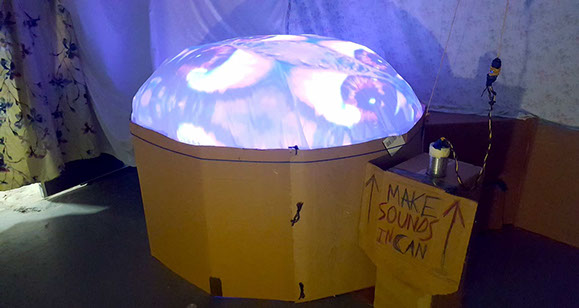

The inflatable projection button thingy is a large inflatable button that you can press down on to change the visual output as well as make noises into the tin-can phone which creates visual changes in color, brightness, and distortions of the imagery.
The button is created with a cardboard base that contains a projector shining on a curved mirror which projects the domed image back onto the plastic sheeting which is inflated by a simple box fan pointing into an opening in the back.
A Leap Motion depth camera is placed within the base, detecting when the plastic sheeting is pushed to a specific distance from it, causing it to switch visual inputs programed within TouchDesigner software.
The tin-can phone has a wireless lav microphone taped to the outside bottom which picks up audio and vibrations that feed into TouchDesigner and create various visual distortions.

The projection mapped box wall projects from a Roku Media Player wirelessly mirroring a tablet monitor running Optoma's Projection Mapper mobile app software.
The box wall currently has three different visual states that can be played including a stop motion paper fire, a nighttime motorcycle love ride animation, and a more random playful 90s themed titular animation for Projection Play Place.
Click image to the right to view projection mapping test of project name animation.
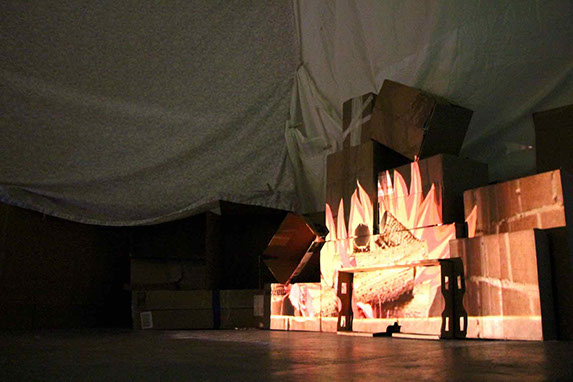
Projection mapping tests with Optoma Projection Mapping Software


